GPU RESOURCE MANAGEMENT & AI PLATFORM

Backslash
AIOps

Request, approve, share, and reclaim GPUs — run the whole process on one platform.

Backslash AIOps unified dashboard

Why AIOps

GPUs sit idle, yet teams can't use them — we fix that.

Keep expensive GPUs busy, stop any one team from monopolizing them, and run the same way even without internet access — built around the problems real operations run into.

  1. Expensive GPUs sit idle

    GPUs that are no longer in use stay occupied. Backslash AIOps reclaims expired allocations automatically and cleans up abandoned sessions when their TTL expires.

  2. One person ties up an entire GPU

    Even a small experiment locks up a whole card. Share one GPU among many with Time-slicing, MPS, or MIG, and split memory and compute shares with HAMi vGPU.

  3. One team monopolizes the GPUs

    Whoever grabs them first keeps them while others wait. Three-level quotas (organization, project, member) cap GPU count, concurrent runs, and monthly GPU hours, and FAIR or DRF policies keep allocation fair.

  4. Requests fail when capacity runs out

    Rejected work has to be resubmitted by hand. Instead of rejecting, the platform queues requests (QUEUED) and runs them automatically by policy when capacity frees up.

  5. No record of who used what, and when

    Approvals and usage get scattered across chats and spreadsheets. Everything from request to reclamation is recorded in GPURequest CRDs and audit logs, and usage exports as PDF, Excel, CSV, or JSON reports.

  6. Air-gapped networks block adoption

    Without internet access, installation stalls from the start. The platform serves its own install scripts, image bundles, and CLI, and registers nodes and clusters with a single command.

Backslash AIOps is a platform that manages GPU requests, approvals, sharing, and reclamation on Kubernetes — and runs the entire AI lifecycle on top of it, from training to serving.

Overview

One flow, from request to reclamation

Requesting, getting approval, using, and returning GPUs all happen inside one platform. Approval history and usage records stay connected end to end.

  1. 1

    Request

    Users request GPUs with a reason and duration

  2. 2

    Approve & assign

    Administrator approval or per-project auto-approval

  3. 3

    Develop & train

    Build models with sessions, jobs, and pipelines

  4. 4

    Model & deploy

    Only approved models go to inference serving

  5. 5

    Monitor

    Observe utilization, temperature, and occupancy from measurements

  6. 6

    Reclaim & report

    Reclaim on expiry and report usage

Key strengths

What Backslash AIOps delivers

  • 01.

    End-to-End GPU Operations

    A single system for request, approval, use, reclamation, and accounting

    • Request → approve → assign → use → reclaim → report, connected without gaps
    • Usage history is kept in both GPURequest CRDs and audit logs
    • Quotas and permissions allocated across organization, project, and member levels
  • 02.

    Practical GPU Sharing

    Technology that truly shares a single GPU

    • Switch among Time-slicing, MPS, and MIG from the UI
    • HAMi-based vGPU allocates memory and compute shares separately
    • Split counts are derived from live node measurements, so displayed values match reality
  • 03.

    Fair & Non-blocking Scheduling

    Wait instead of failing, then run automatically

    • When resources run short, requests are queued (QUEUED), not rejected — and rescheduled automatically
    • Choose FIFO, LIFO, FAIR, or DRF per cluster
    • Distributed training secures all required pods together with gang scheduling
  • 04.

    Air-gapped Ready Operations

    Operations designed for air-gapped and multi-cluster environments

    • Register nodes and clusters with one command, even without internet access
    • The platform serves its own install scripts, image bundles, and CLI
    • Access is controlled and recorded with OIDC SSO, 2FA, PAT, and audit logs

Architecture

The AI lifecycle, built on top of resource management.

From the bottom up: Kubernetes infrastructure, GPU resource management above it, and MLOps and runtime environments on top. Each layer scales independently and is designed for air-gapped and multi-cluster environments.

Users

  • AI developers
  • Data analysts
  • Operators & admins
  1. Users & runtime

    • Quick start
    • Sessions (JupyterLab)
    • Jobs & distributed training
    • Workspaces
  2. MLOps pipeline

    • Datasets
    • Pipelines (Argo)
    • Experiments (MLflow)
    • Model registry
    • Serving (KServe)
  3. Resource management & scheduling

    • Request · approve · reclaim
    • Queue policies FIFO/LIFO/FAIR/DRF
    • GPU sharing strategies
    • Project quotas
    • Resource presets
  4. Operations & security

    • Monitoring & alerts
    • Reports
    • Audit logs
    • SSO · 2FA · PAT
    • Infrastructure packages
  5. Infrastructure

    • Kubernetes
    • HAMi vGPU
    • GPU Operator · DCGM
    • Prometheus · Grafana
    • NFS · Object Storage
    • Container Registry

Features

From GPU operations to MLOps: 14 features, shown in the product

Resource operations

Everything you operate, on one screen

Unified dashboard

  • Aggregates cluster, node, and GPU slot occupancy in real time on a single screen
  • See your running jobs alongside project quota usage
  • Cluster cards summarize Ready nodes, average utilization, and peak temperature
  • Jump straight to pending work such as alerts and approvals
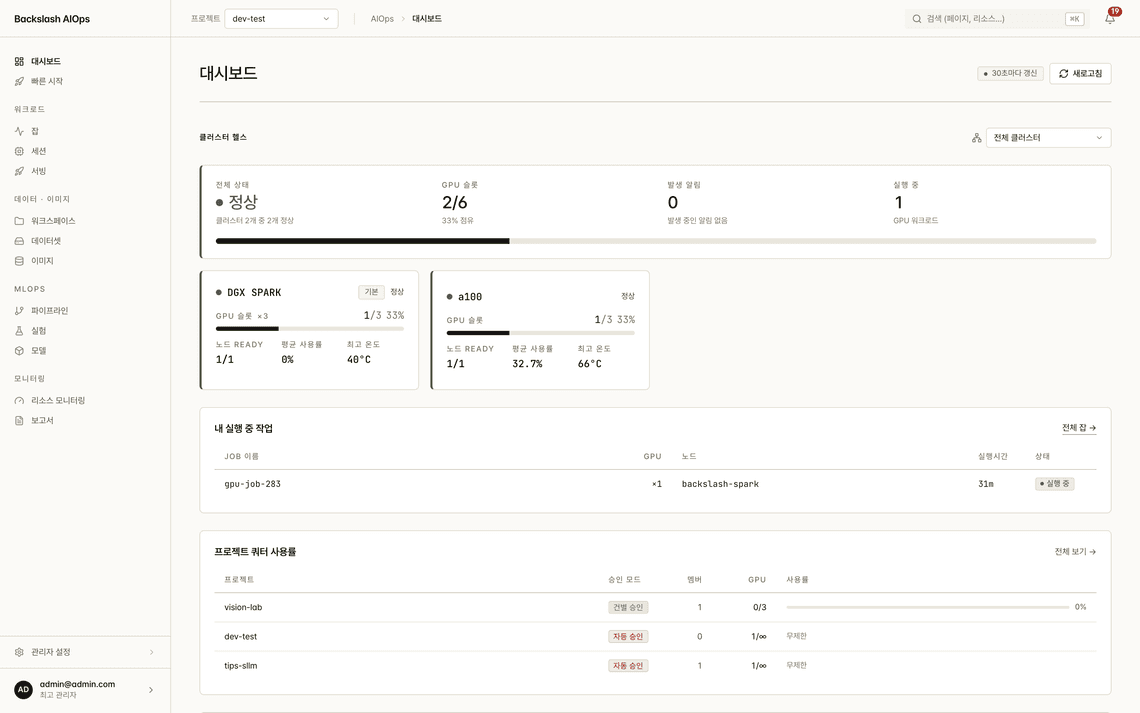
Backslash AIOps dashboard showing cluster health, GPU slots, running jobs, and project quota usage123
  1. 1GPU slots and node status per cluster
  2. 2Jobs you are running now
  3. 3Quota consumption by project
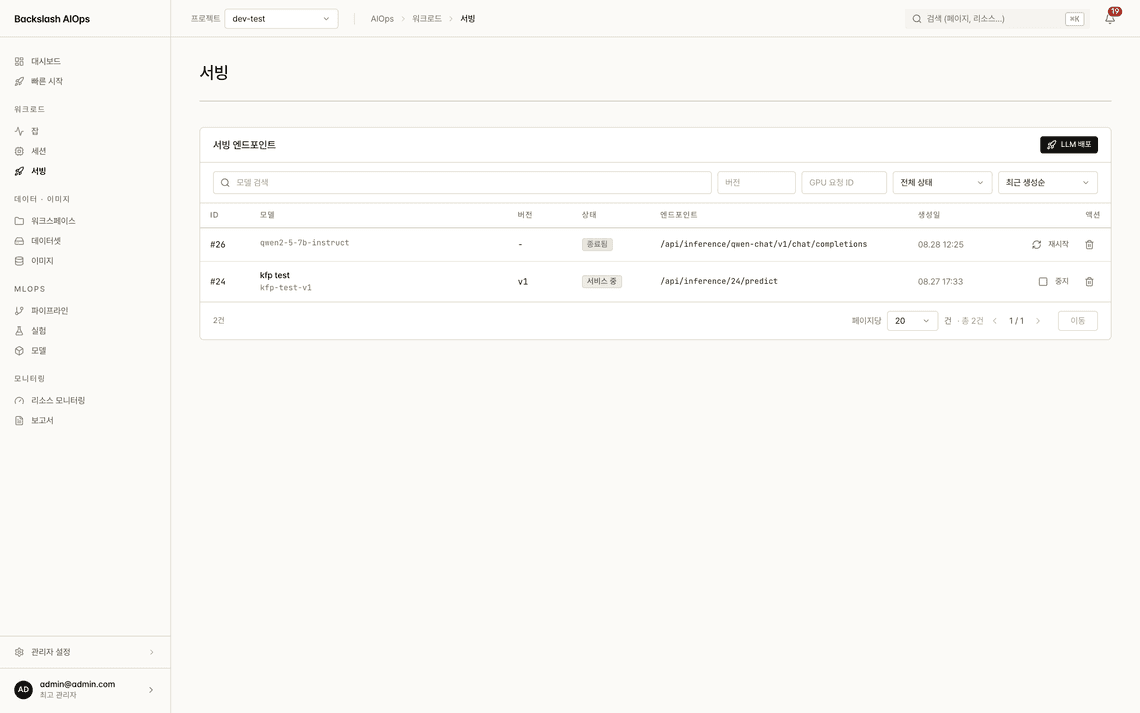
Resource operations

From request to approval to reclamation

GPU request workflow

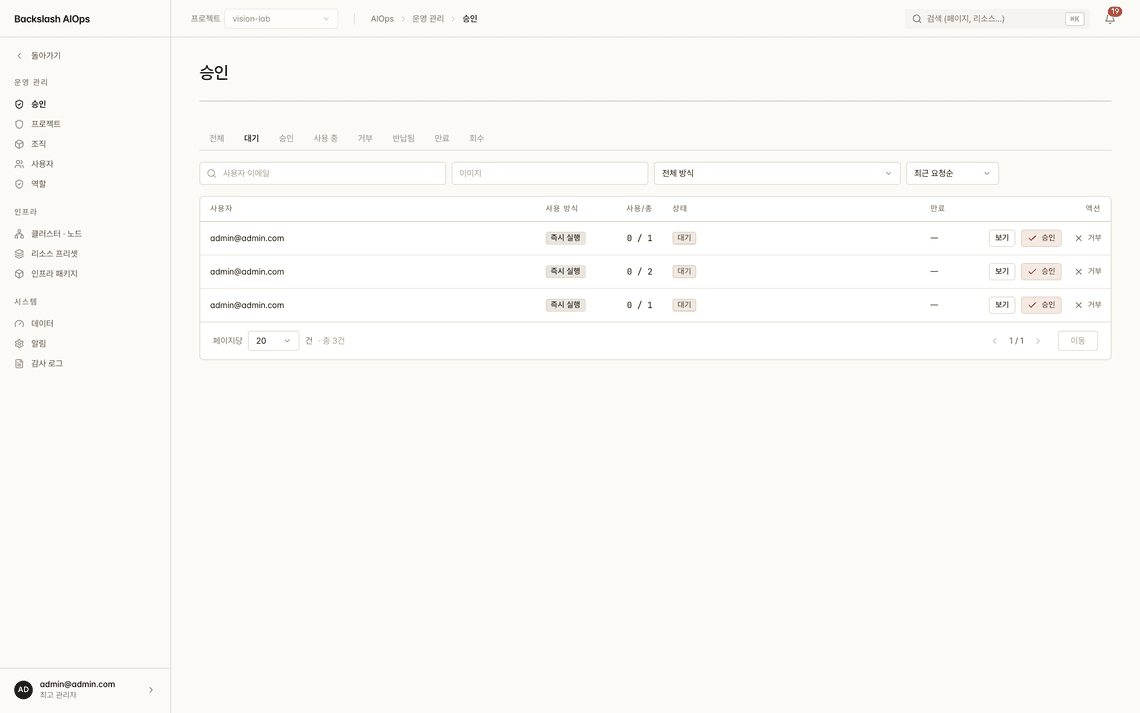
  • Users request GPUs with a reason and duration; administrators approve or reject
  • Per-project auto-approval removes repetitive approvals
  • Expired allocations are reclaimed automatically — nothing stays occupied and idle
  • Every request, approval, and reclamation is recorded as a GPURequest CRD
Backslash AIOps approvals screen listing GPU requests and their approval status1
  1. 1Only requests awaiting approval

Resource operations

One GPU, shared by many

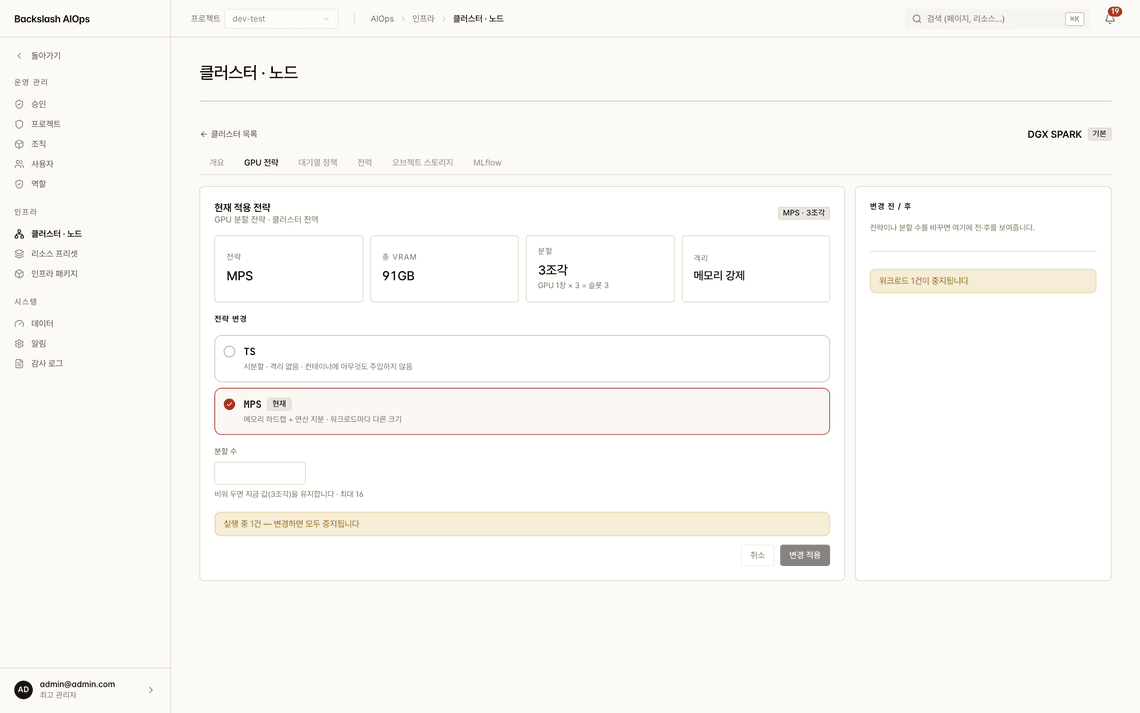
GPU sharing strategies

  • Switch between Time-slicing, MPS, and MIG modes from the UI
  • The current split count comes from live node measurements, not settings, so it always matches reality
  • The platform runs the required drain and restart steps for you, one by one
  • HAMi-based vGPU allocates GPU memory and compute shares separately
Backslash AIOps GPU sharing screen for switching the sharing mode per node1
  1. 1Switch Time-slicing · MPS · MIG

Resource operations

No project left starving

Queue policies and automatic rescheduling

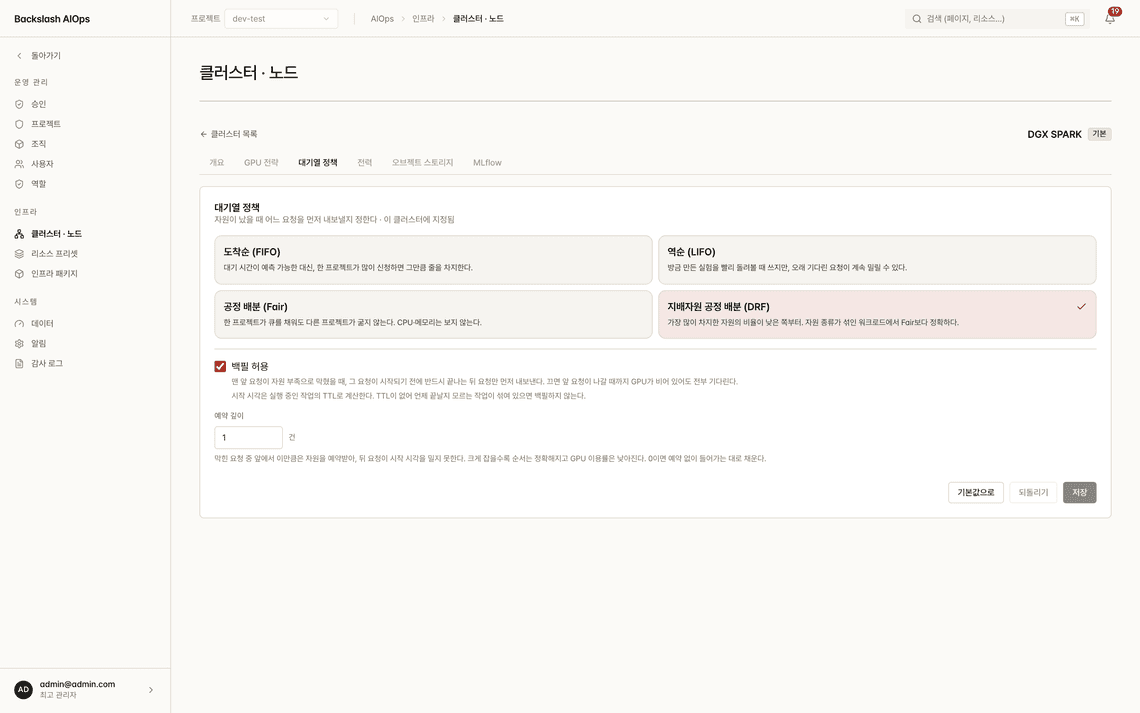
  • When resources run short, requests wait (QUEUED) instead of failing — and run automatically when capacity frees up
  • Choose among FIFO, LIFO, FAIR, and DRF per cluster
  • Fairness is measured per project — the same unit as quotas and accounting
  • DRF weighs GPU, CPU, and memory together, staying accurate for mixed workloads
Backslash AIOps scheduling settings for choosing a queue policy per cluster1
  1. 1Choose FIFO · LIFO · FAIR · DRF

Resource operations

Per organization and project

Quotas and permissions

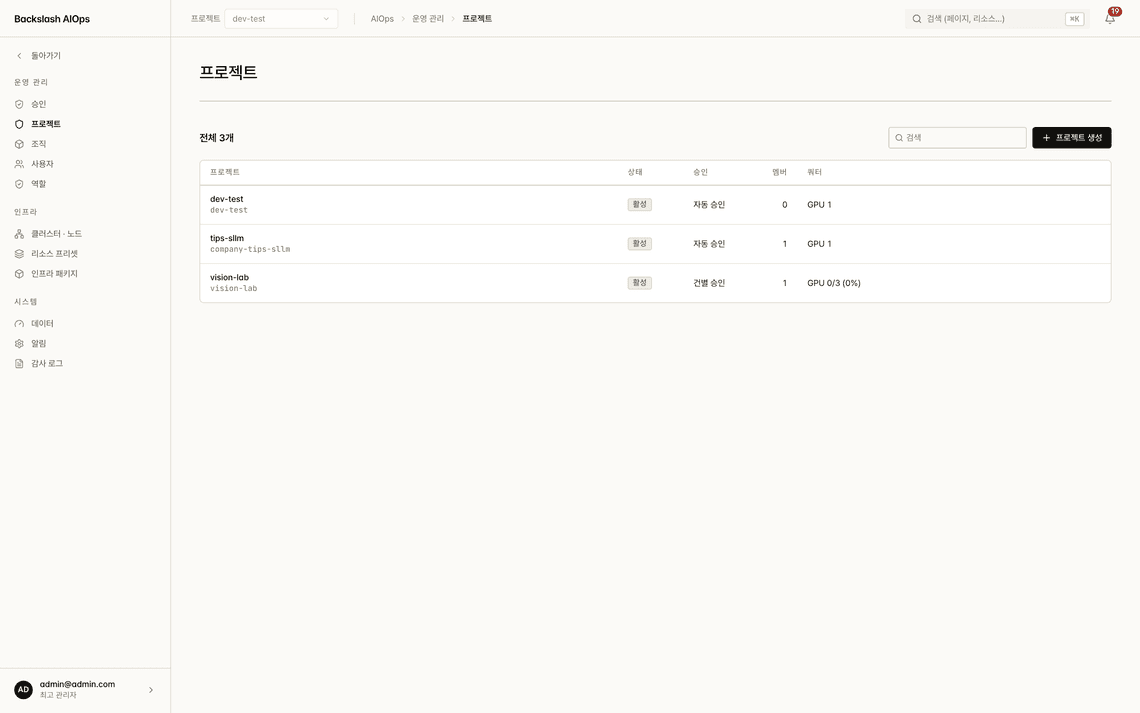
  • Allocate resources through a three-level organization → project → member structure
  • Limit GPU count, concurrent runs, and monthly GPU hours per project
  • Quota usage is tallied by CRD counting — accurate even on shared GPUs
  • Users pick from resource presets defined by administrators
Backslash AIOps project management screen showing GPU limits and approval modes12
  1. 1Set a GPU limit per project
  2. 2Projects with manual approval

Development & runtime

Jobs, sessions, and serving in one flow

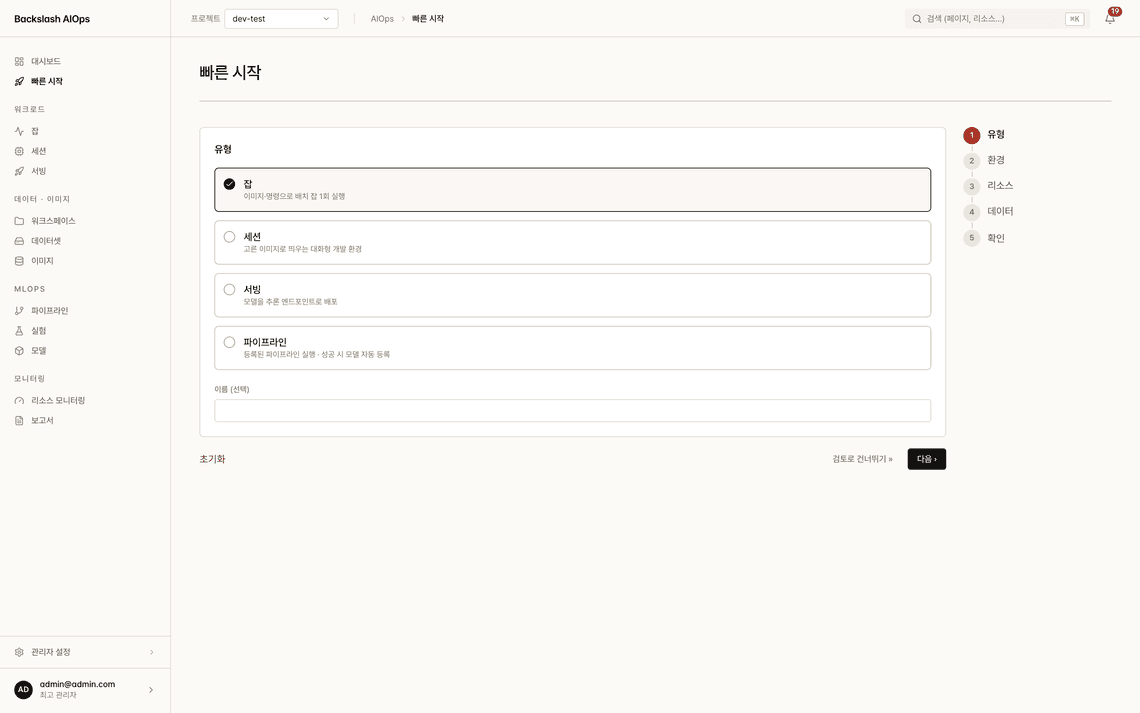
Quick start

  • Launch training jobs, notebook sessions, model serving, and pipelines from a single entry point
  • Type → environment → resources → data → review: five steps to a running workload
  • Pick an image, a dataset, and resources; the platform configures the rest
  • Re-run any previous run as it was — settings are restored for reproducibility
Backslash AIOps quick start screen for choosing a workload type and steps12
  1. 1Jobs · sessions · serving · pipelines
  2. 2Running in five steps

Development & runtime

Submit and track training work

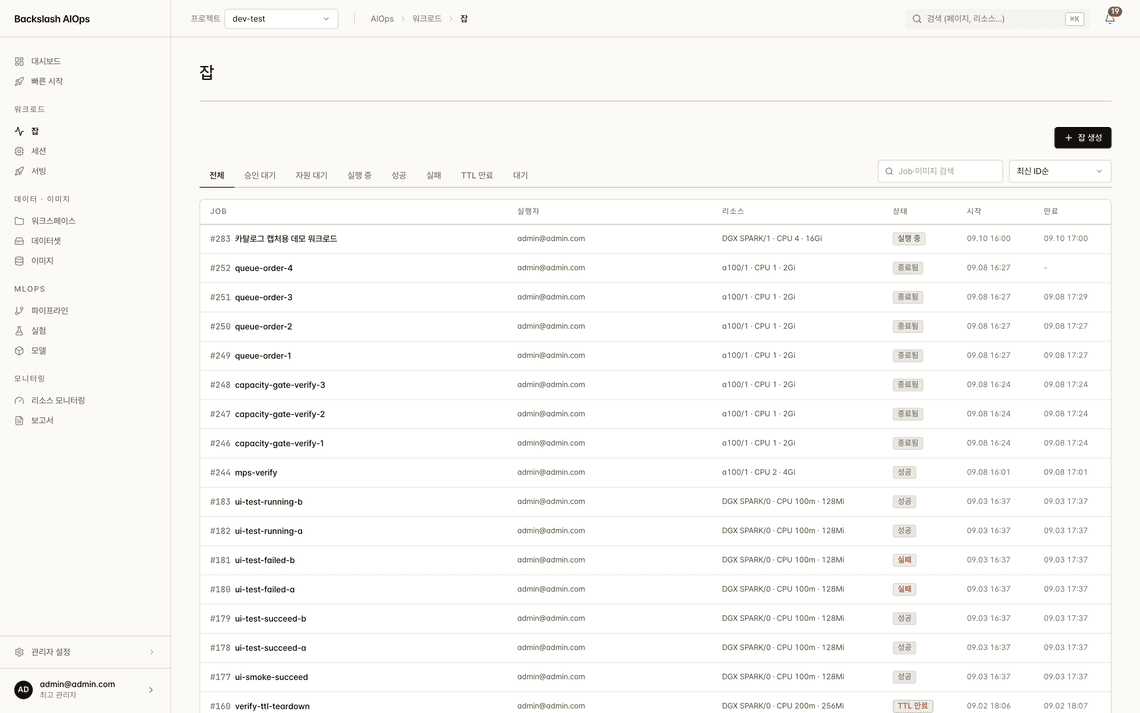
Jobs and distributed training

  • Submit single-node training and multi-pod distributed training from the same screen
  • Gang scheduling — all required pods start together once they are secured
  • Track distributed training with per-rank logs
  • Filter by state: waiting for resources, running, succeeded, failed, or TTL expired
Backslash AIOps jobs screen listing training jobs by status with resource usage12
  1. 1Filter by status
  2. 2GPU · CPU · memory usage

Development & runtime

Development environments, ready instantly

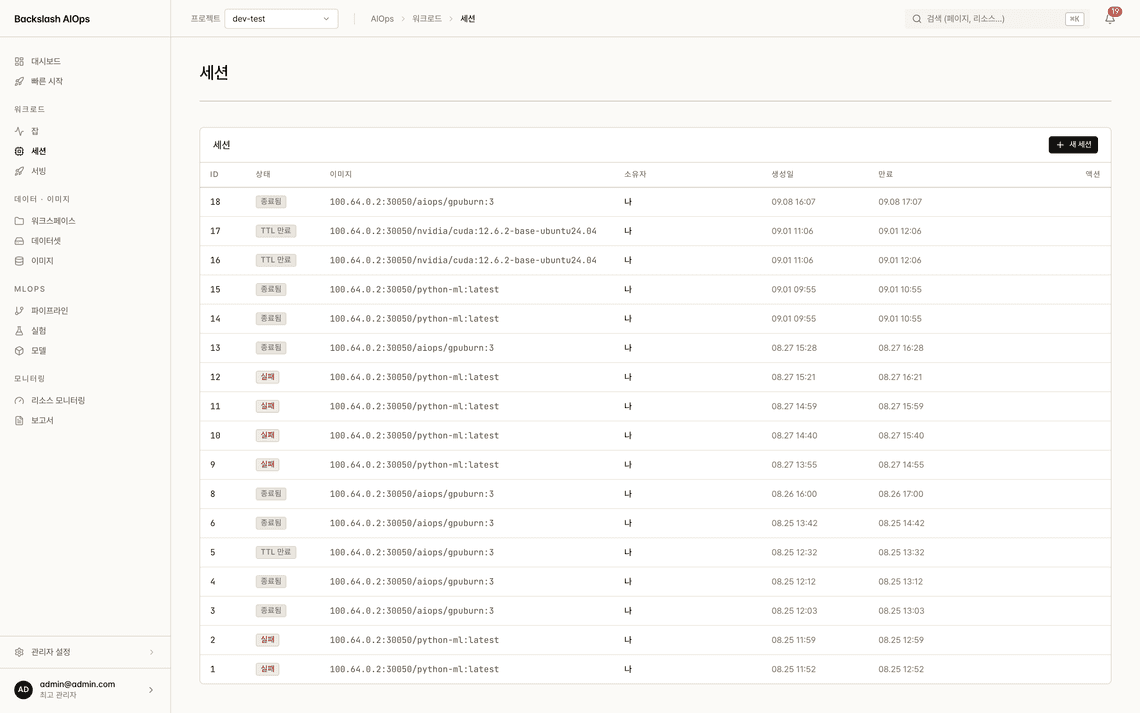
JupyterLab sessions

  • Launch JupyterLab instantly on approved GPUs
  • Connect through the platform proxy — no node ports are opened
  • Workspaces and datasets are mounted into sessions automatically
  • TTL expiry cleans up abandoned sessions to prevent waste
Backslash AIOps sessions screen listing JupyterLab sessions and their expiry times12
  1. 1Starts instantly on approved resources
  2. 2Reclaimed automatically when time is up

Data & images

Pin down environments and data

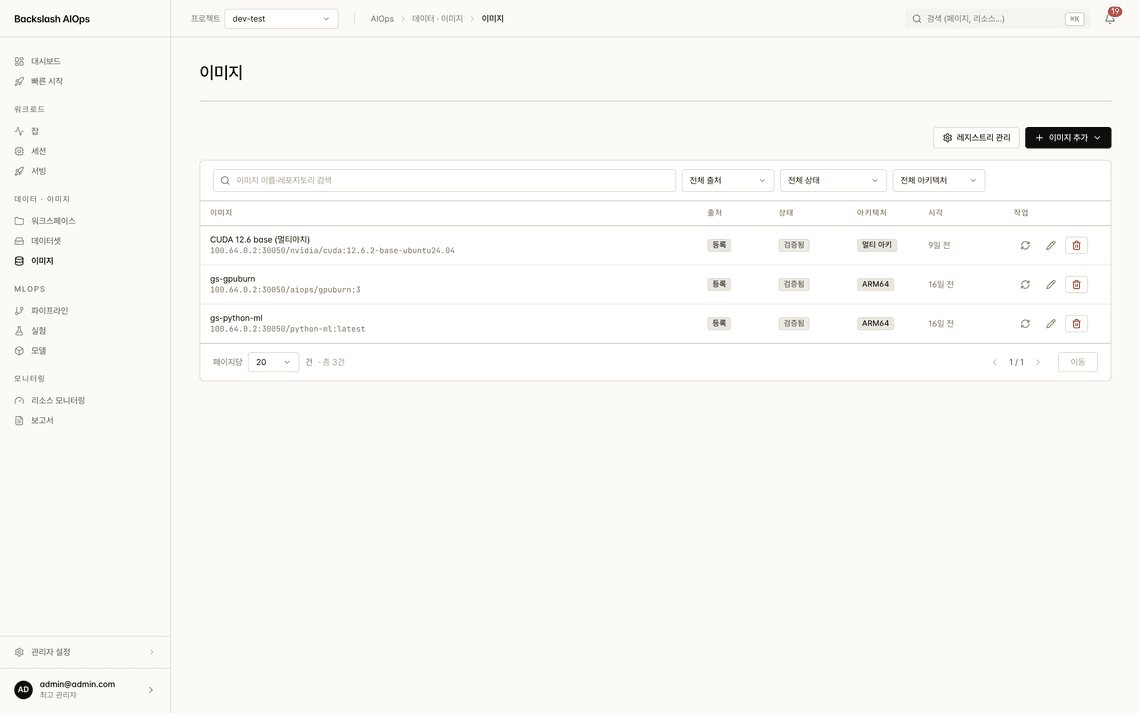
Image and dataset management

  • Build container images inside the platform and register them in the registry
  • Architecture checks (ARM64 · AMD64) filter out images that cannot run
  • Share datasets at public, project, or personal scope
  • Connect object storage to use external data sources as they are
Backslash AIOps image management screen showing container images and architecture checks12
  1. 1Connect a private registry
  2. 2ARM64 · AMD64 check

MLOps

Automate repetitive work

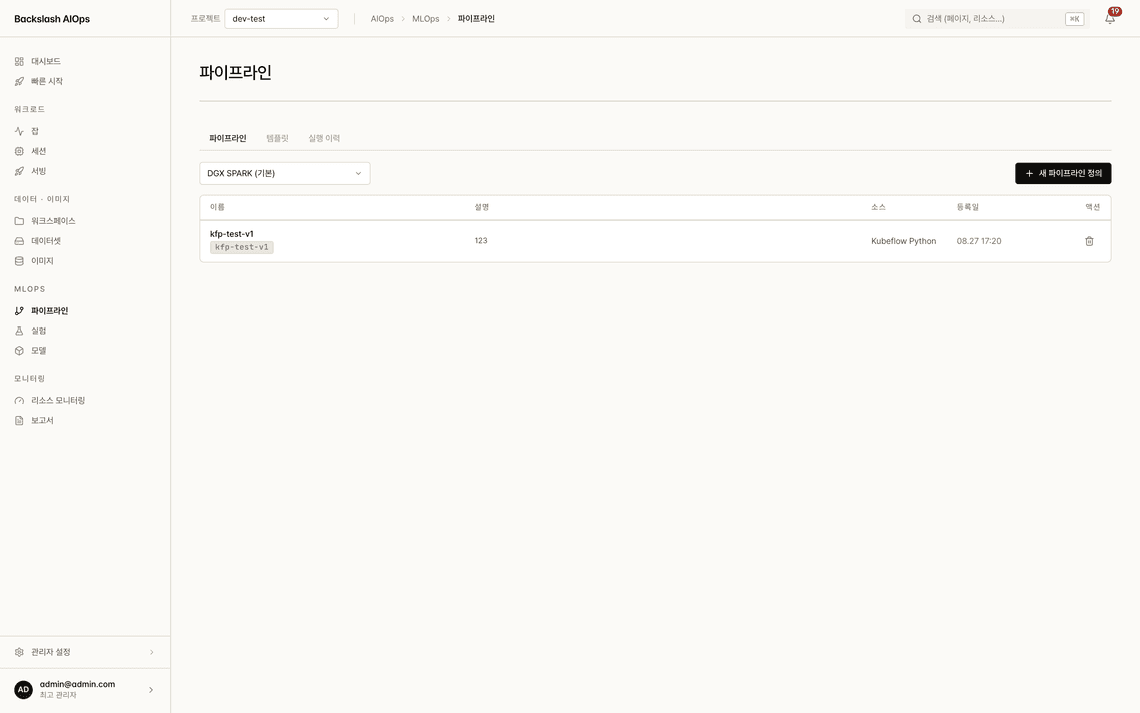
Pipelines and experiment tracking

  • Chain preprocessing → training → evaluation → deployment on Argo Workflows
  • Compile Kubeflow pipelines and register them as they are
  • Save templates for repeat runs — every run keeps its history
  • MLflow integration records metrics, parameters, and artifacts automatically
Backslash AIOps pipelines screen showing pipeline templates and run history12
  1. 1Every run keeps its history
  2. 2Argo · Kubeflow pipelines

MLOps

Deployed only after approval

Model registry and serving

  • When training succeeds, the model version is registered automatically (pending review)
  • A single-gate lifecycle: pending review → approved → deployed → retired
  • Unapproved models cannot be deployed — the platform blocks it
  • Deploying with KServe generates a REST endpoint automatically
Backslash AIOps models screen showing model version status and serving endpoints12
  1. 1REST endpoint generated automatically
  2. 2One-click deployment with KServe

Monitoring & operations

Resources and workloads, side by side

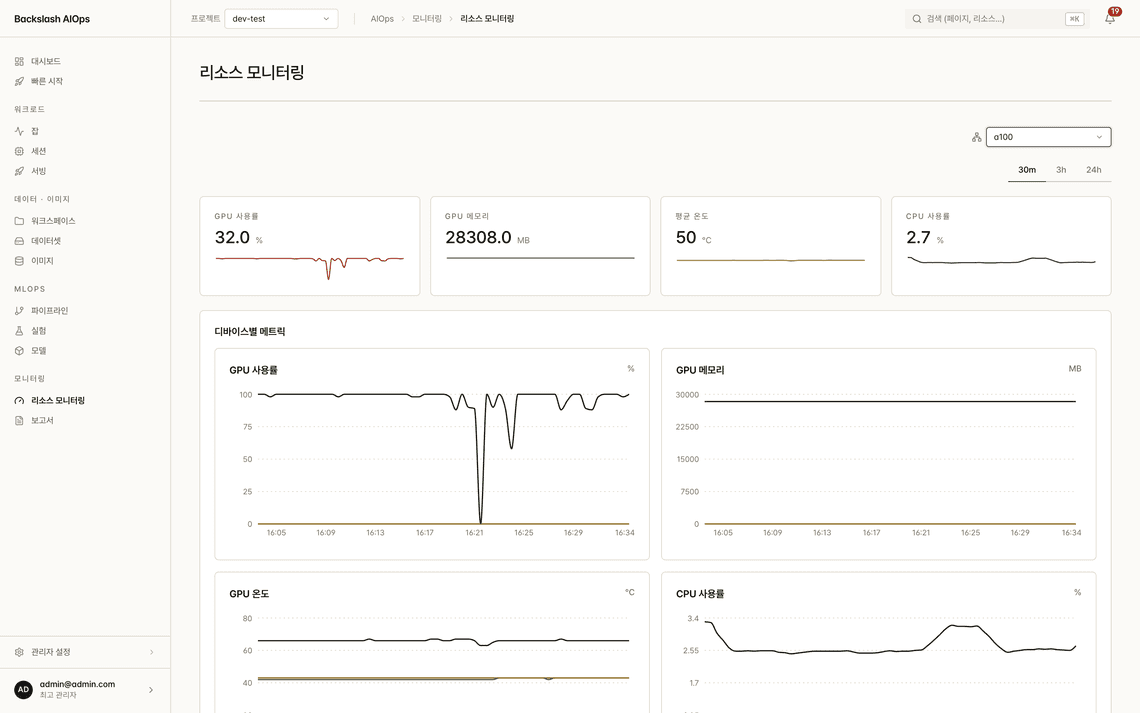
Monitoring and alerts

  • View GPU utilization, memory, and temperature per node and per job
  • Measured metrics from DCGM Exporter and Prometheus
  • Define threshold-based alert rules in the UI and deliver them by web, push, or webhook
  • Export GPU usage reports as PDF, Excel, CSV, or JSON
Backslash AIOps resource monitoring screen with GPU utilization, memory, and temperature charts12
  1. 1Measured DCGM metrics
  2. 2Per node and per job

Infrastructure

Attach with a single command

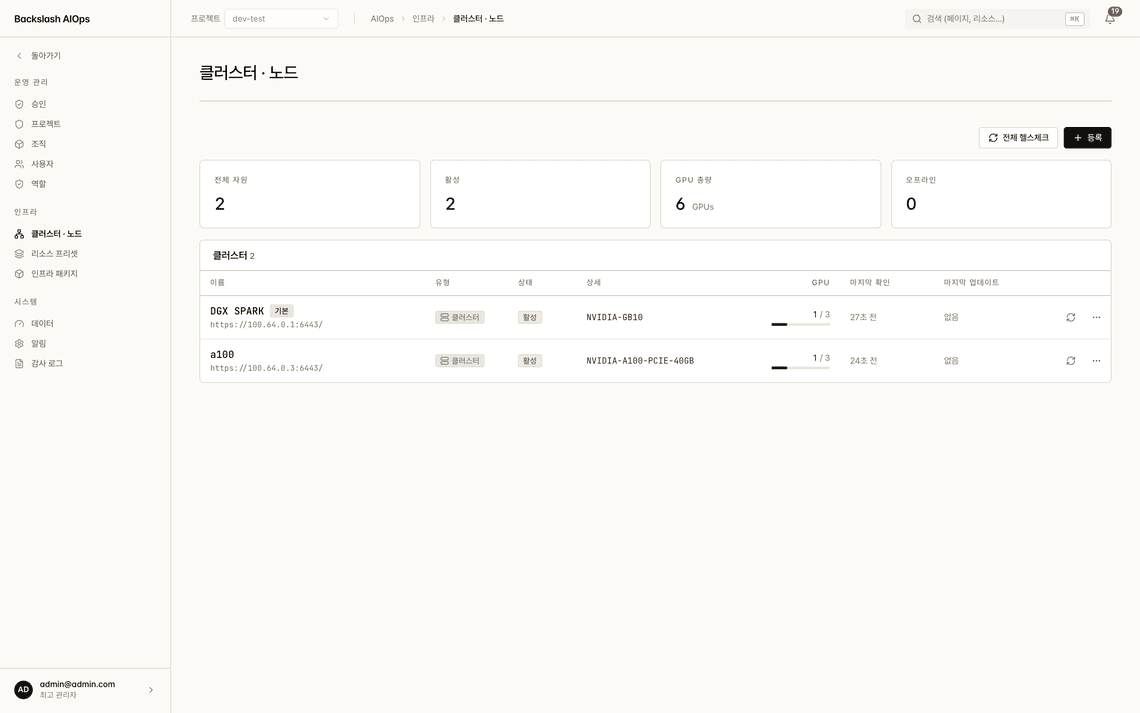
Cluster and node registration

  • Register nodes with the one-line install command the wizard generates
  • Connect remote clusters with a connector agent — run many clusters from one screen
  • The platform serves the image bundles needed for air-gapped installs
  • Run infrastructure package upgrades and rollbacks from the UI
Backslash AIOps clusters and nodes screen showing registered clusters and GPU totals12
  1. 1Register a node with one command
  2. 2Many clusters on one screen

Security & audit

Control and record

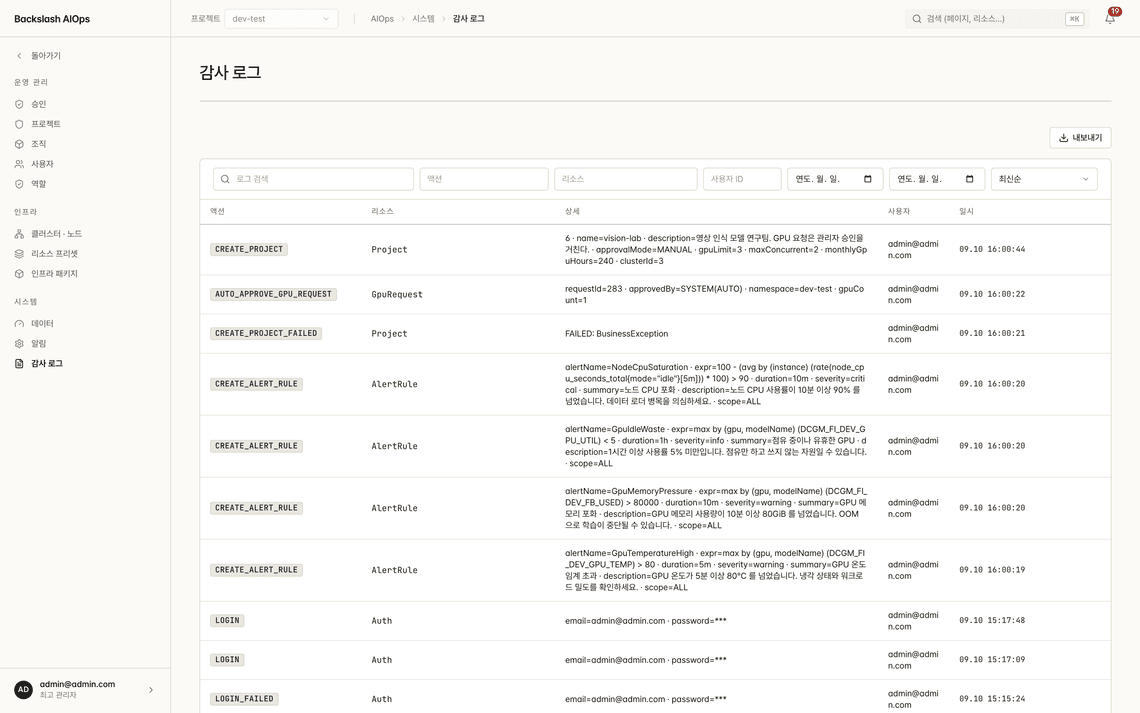
Access control and audit logs

  • Standard OIDC SSO — connects to your corporate IdP through issuer discovery
  • Supports two-factor authentication (TOTP) and personal access tokens (PAT) for automation
  • Fine-grained role permissions control menus and API access together
  • Records every login, resource request, approval, and configuration change, ready to export
Backslash AIOps audit log screen recording actions, resources, users, and timestamps12
  1. 1Who · what · when
  2. 2Download for audits

Deployment

Works with your network and hardware as they are.

No internet, several clusters, or a mix of GPU models — it runs the same way.

  1. 01

    On-premises

    Installed directly on GPU servers in your data center. Your data never leaves.

  2. 02

    Air-gapped

    Installed and operated without internet access. The platform supplies install scripts and image bundles.

  3. 03

    Multi-cluster

    Connect remote clusters with a connector agent and run them together from one screen.

  4. 04

    Heterogeneous GPUs

    Runs different NVIDIA GPU hardware the same way — A100, H100, H200, B200, B300, and DGX Spark (GB10, aarch64).

Built on proven open source

  • Kubernetes
  • HAMi vGPU
  • NVIDIA GPU Operator
  • DCGM
  • Argo Workflows
  • KServe
  • MLflow
  • Prometheus · Grafana
  • Spring Boot
  • Next.js

FAQ

Frequently asked questions

What is Backslash AIOps?

Backslash AIOps is a platform that manages GPU requests, approvals, sharing, and reclamation on Kubernetes — and runs the entire AI lifecycle on top of it, from training to serving.

Can several users share one GPU?

Yes. You can switch among three sharing modes — Time-slicing, MPS, and MIG — from the UI, and HAMi-based vGPU allocates GPU memory and compute shares separately. Split counts are derived from live node measurements, so what you see matches the hardware.

Can it be installed on an air-gapped network?

Yes. The platform supplies its own install scripts and image bundles so it can be installed and operated without internet access, and nodes and clusters are registered with a single command.

Are requests rejected when GPUs run out?

No. When resources are short, requests wait in the queue (QUEUED) instead of being rejected, and run automatically according to the cluster's policy — FIFO, LIFO, FAIR, or DRF — when capacity frees up.

What GPU hardware does it run on?

It supports NVIDIA GPUs including A100, H100, H200, B200, and B300, and runs different hardware the same way, down to DGX Spark (GB10, aarch64). On-premises data centers and multi-cluster environments are supported as well.

Considering Backslash AIOps?

Tell us about your GPU hardware and network environment, and we'll review how to deploy it with you.

\ BACKSLASH \

CEO: Song Juhyun | Business Registration No: 787-81-02609
Seoul Branch: Room 702, 120 Gasan digital 1-ro, Geumcheon-gu, Seoul
Corporate Research Institute: 204, 16 Pusan National University-ro, Mulgeum-eup, Yangsan-si, Gyeongsangnam-do
Busan Branch: Room 204, 76-1 Hyoyeol-ro, Buk-gu, Busan
Daegu Branch: Room 307, 3F, 56 Chilseongnam-ro 38-gil, Buk-gu, Daegu
Customer Service: +82 1555-2440 (Weekdays 10AM-6PM) | Email: contact@backslash.co.kr
Industrial Design Company Registration No. 18330

© 2026 BackslashPartners Co., Ltd. All right reserved.