AX CASE · GLOBAL eSIM CUSTOMER OPERATIONS

KOSIMAI Operations Case Study

A unified operations platform that connects global customer touchpoints through support, technical diagnosis, refunds, and operating decisions with AI.

Featured case · KOSIM

Unified inbox screen

Why KOSIM

Not a typical e-commerce support desk

KOSIM sells eSIM plans for 149+ countries. A FAQ chatbot is not enough — the real need is an AX platform centered on how the service actually runs.

  1. 24/7 demand

    Inquiry types shift before departure, on arrival, during travel, and after return.

  2. Timezone gaps

    Agents in Korea cannot always respond instantly while customers are abroad.

  3. Technical tickets

    Install, activation, data connection, QR reissue, and refunds dominate the queue.

  4. Support when offline

    Customers often need help when connectivity fails — and may write in many languages.

The point is not answers alone. AI should diagnose the issue and carry out the operating work required to resolve it.

Customer journey

Classify by travel stage, not just ticket text

“No internet” before departure is not the same as “no internet” after landing in Japan. Orders, eSIM state, travel stage, and connectivity context must travel together.

KOSIM AI Operations dashboard — consultation volume and VOC status by channel
  1. 01

    Pre-travel

    Purchase & install

    • Device eSIM support
    • QR & early install
    • Cancel / refund
  2. 02

    On arrival

    Urgent peak

    • No local data
    • No service
    • Roaming & network setup
  3. 03

    In travel

    Churn risk

    • Sudden drops
    • Slow speed
    • Crossing countries
  4. 04

    Post-travel

    Aftercare

    • Delete eSIM
    • Unused refund
    • Receipts

KOSIM AI’s edge is understanding order, eSIM status, travel stage, and connectivity together.

Pillars

Change connection and operations, not just replies

Four pillars cover the customer edge through internal operations.

  • 01.

    AI VOC

    24/7 intake & first response

    Unify web, app, KakaoTalk, email, and phone into one support flow with automatic classification.

  • 02.

    AI Agent

    Analyze and execute

    Go beyond chat: look up orders, guide QR delivery, and open refund workflows against live systems.

  • 03.

    AI Diagnosis

    eSIM & connectivity checks

    Separate what APIs can confirm from what the customer or app must provide — never invent network state.

  • 04.

    AI Intelligence

    VOC into decisions

    Turn spikes by country or plan into quality and supplier signals, not just ticket counts.

Product screens

From the admin console to customer chat

Admin console

Operations dashboard

  • See consultation volume and AI resolution across five channels.
  • Spot spikes by country and by hour of day.
  • Track items needing operator review beside live AI VOC.
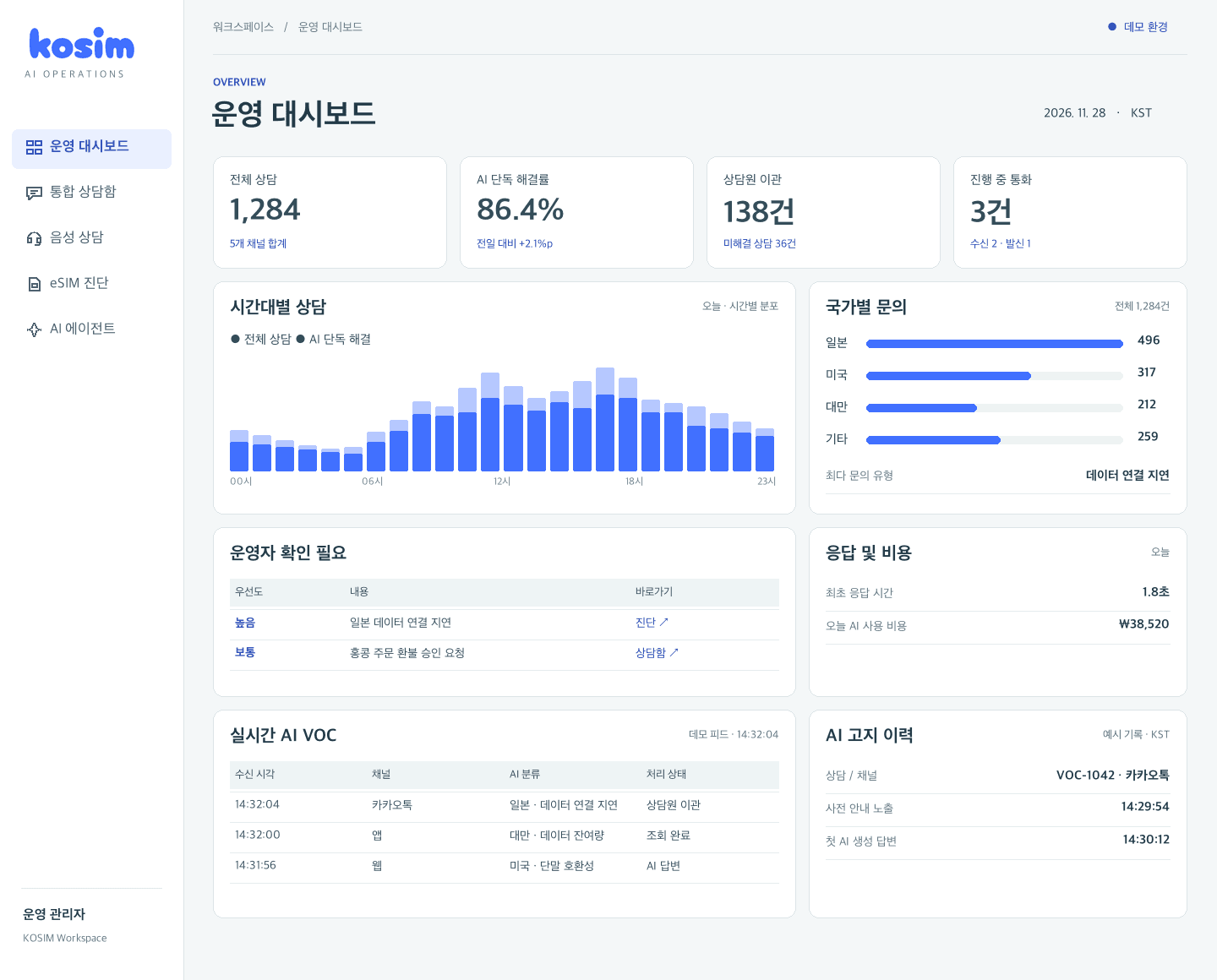
Operations dashboard screen

Admin console

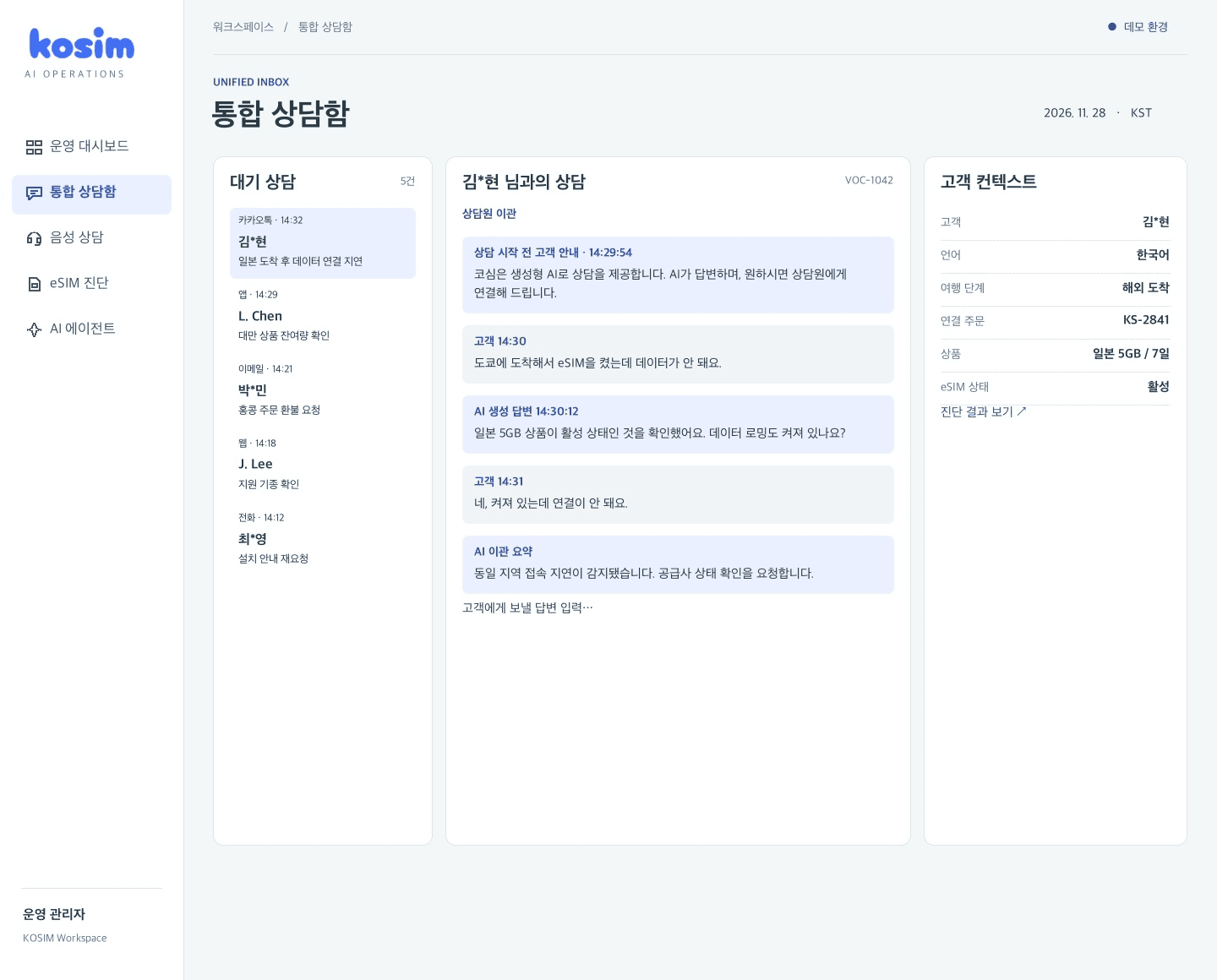
Unified inbox

  • Bring KakaoTalk, app, email, web, and phone into one inbox.
  • Keep conversation history next to order, travel stage, and eSIM status.
  • Hand off with an AI transfer summary so agents keep context.
Unified inbox screen

Admin console

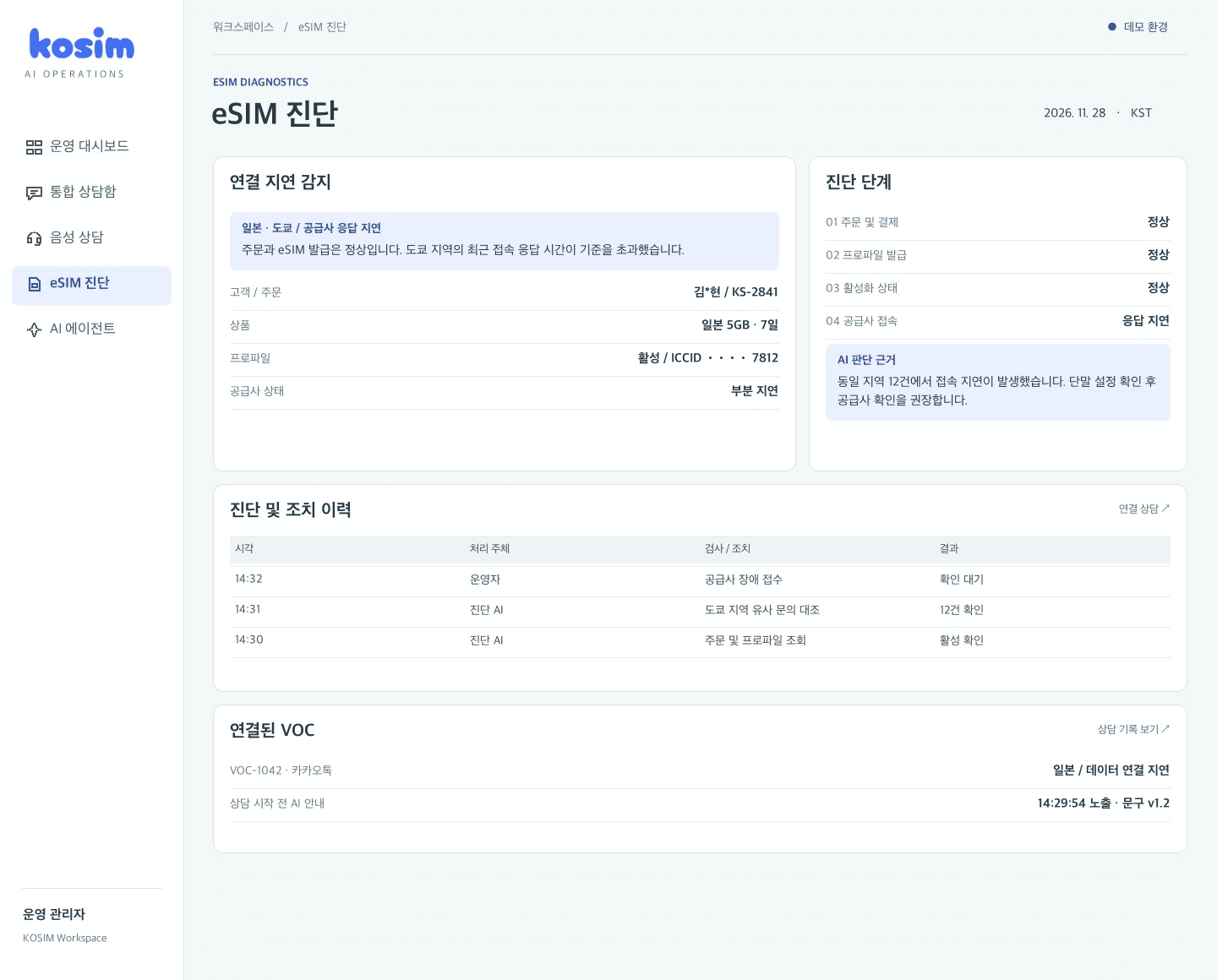
eSIM diagnosis

  • Check order, issuance, activation, and carrier access step by step.
  • Separate API-confirmed facts from customer or app input.
  • Group similar regional tickets to surface supplier issues faster.
eSIM diagnosis screen

Admin console

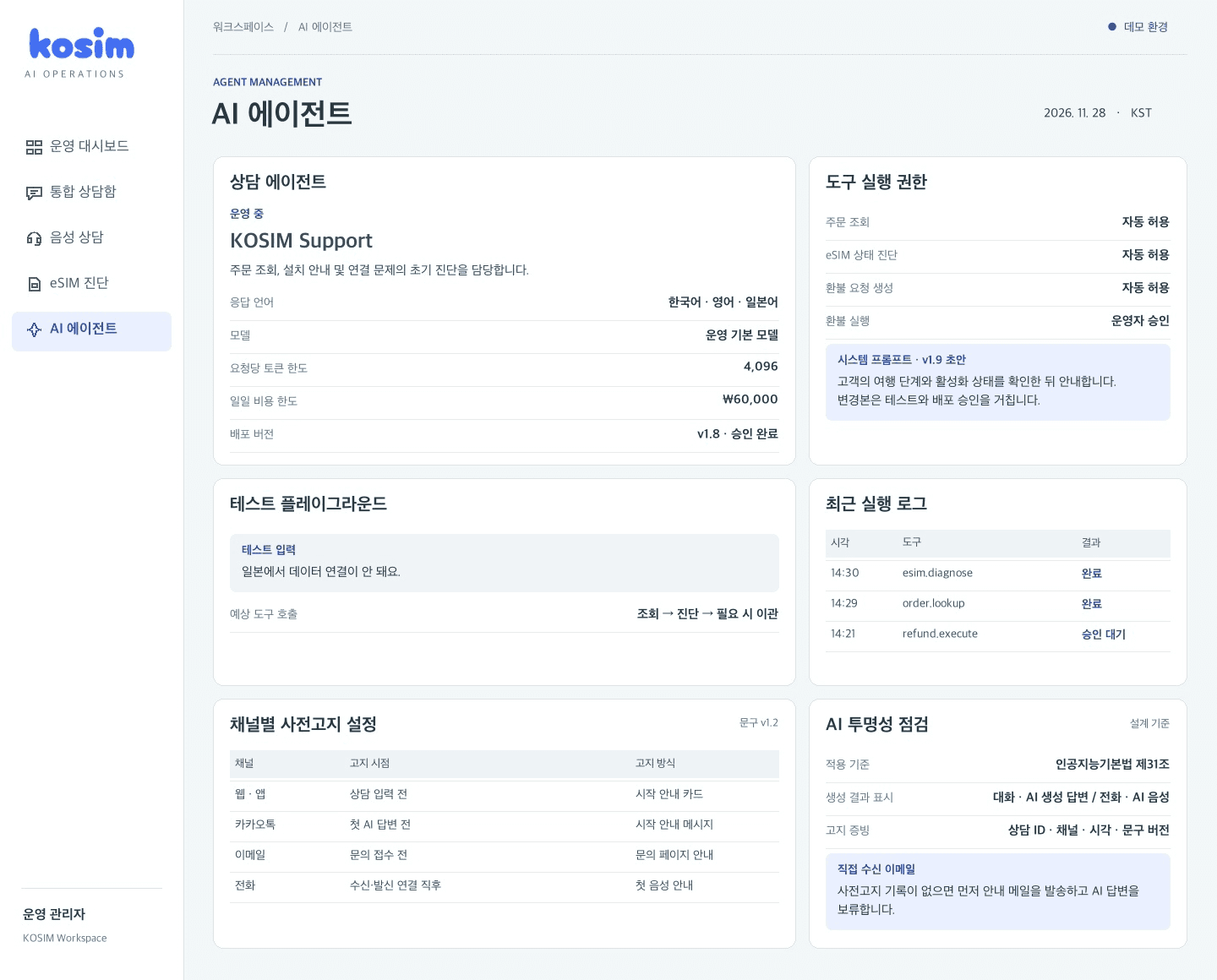
AI agent

  • Allow lookups and diagnosis automatically; gate refund execution behind approval.
  • Configure when and how AI disclosure appears per channel.
  • Check disclosure labels and proof against AI Framework Act Article 31.
AI agent management screen

Admin console

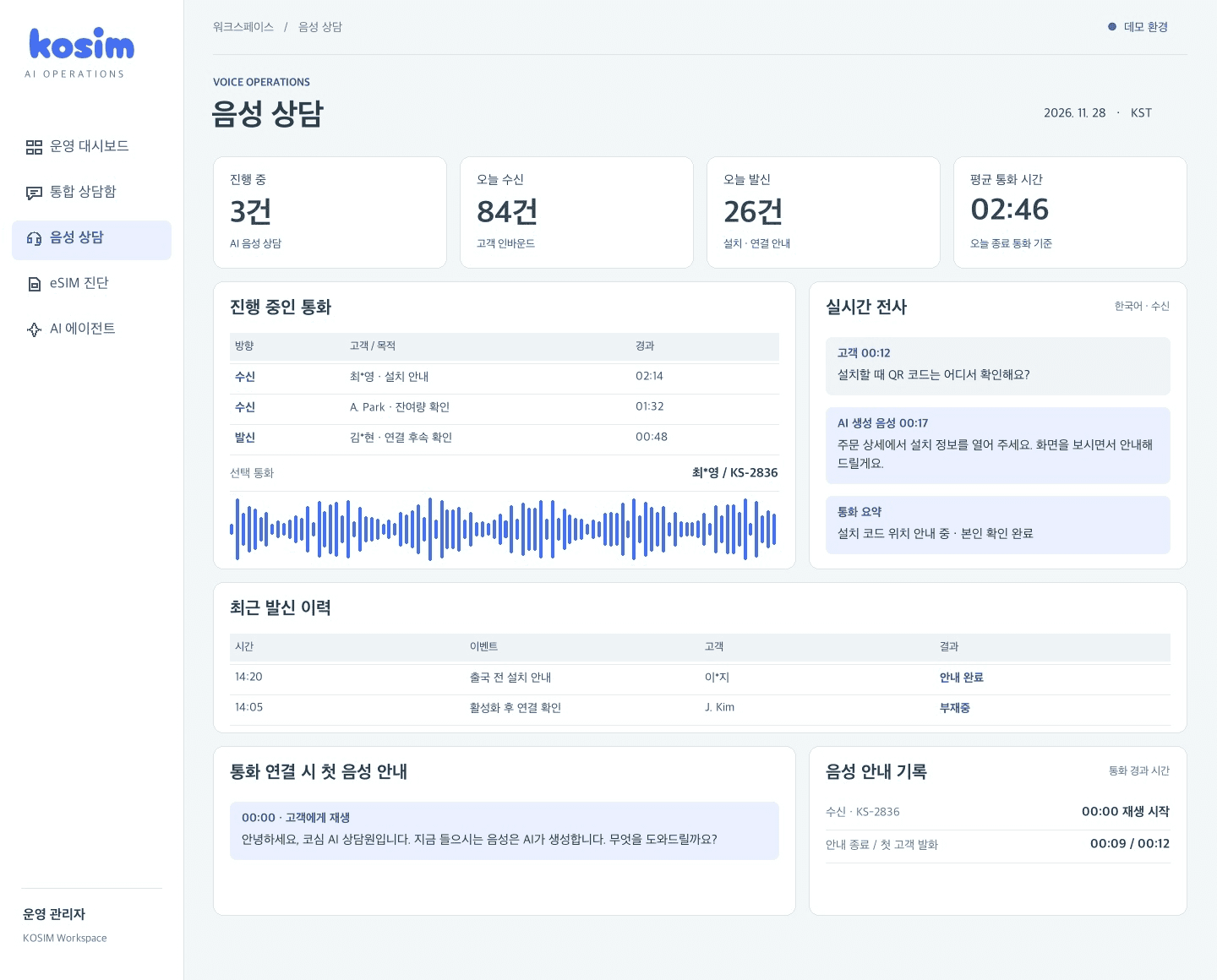
Voice operations

  • Monitor inbound and outbound calls in real time.
  • Store transcripts in the same VOC history as chat.
  • Record the first AI voice disclosure and call summary.
Voice operations screen

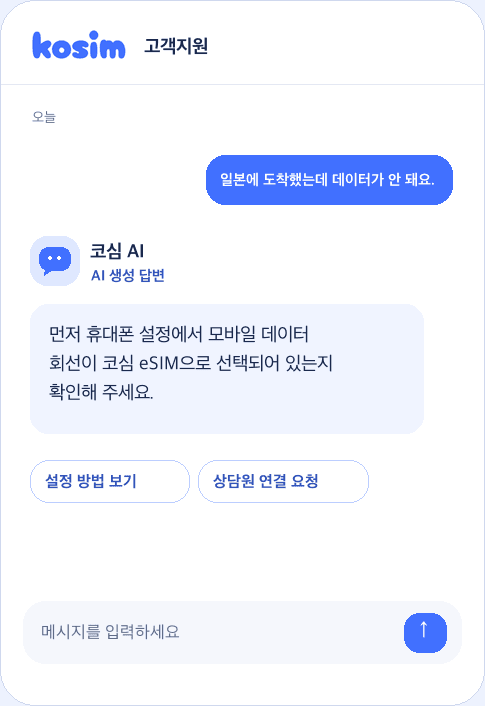
Customer support

AI chat

  • Label every AI-generated reply clearly.
  • Offer setup guides and human handoff in one place.
  • Start with travel-stage aware answers for connection issues.
Customer AI chat screen

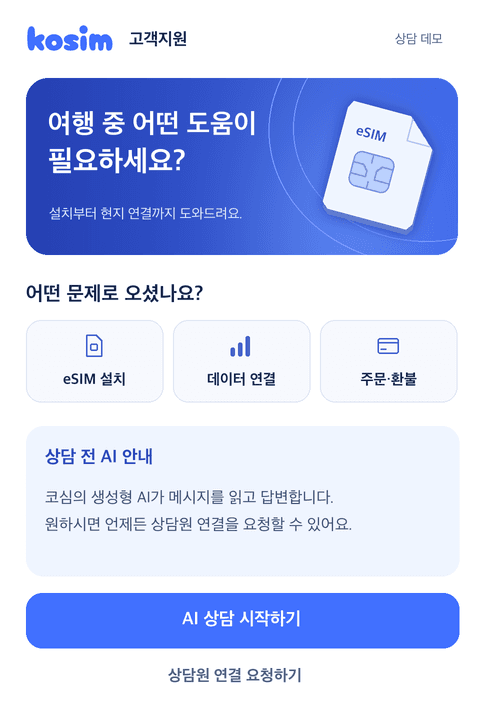
Customer support

Before chat starts

  • Let customers pick install, data connection, or order and refund first.
  • Disclose that generative AI will respond before chat starts.
  • Separate starting AI chat from requesting a human agent.
Pre-chat AI disclosure and issue-type selection screen

Modules

AX means support connected to service APIs

Modules plug into KOSIM operating data — not a standalone FAQ bot.

  • AI VOC

    24/7 automated support and intake

  • AI Agent

    Order lookup, install guidance, resolution

  • AI Diagnosis

    eSIM and network issue diagnosis

  • AI Translation

    Multilingual understanding and replies

  • AI Knowledge

    KOSIM knowledge base & RAG

  • AI Analytics

    VOC patterns and complaint analysis

  • AI Automation

    Repetitive ops automation

Architecture

Add an AI Operations layer on the existing stack

Keep the web, app, order, and eSIM systems. Layer consultation, diagnosis, and automation on top.

Channels

  • Web
  • App
  • KakaoTalk
  • Email
  • Phone
  • SNS
  1. Omni-channel Gateway

    • Web/App widget
    • Kakao & email
    • Voice/phone
    • Unified history
  2. AI Intelligence Layer

    • Support agent
    • Diagnosis
    • Multilingual
    • Automation
    • RAG
    • VOC analysis
  3. Business Integration

    • Orders & payments
    • eSIM issuance
    • Supplier APIs
    • Refunds
    • Members
    • Alerts
  4. Operations & Analytics

    • Unified VOC
    • Agent workbench
    • Incident monitoring
    • Exec dashboard

Roadmap

Ship what reduces tickets first

Prioritize capabilities that cut real customer inquiries before expanding globally.

  1. 01

    Phase 1 · MVP

    Unified AI VOC

    • Web/App AI support
    • Order & eSIM APIs
    • RAG FAQ
    • Handoff inbox
  2. 02

    Phase 2 · AX

    Diagnosis & automation

    • eSIM diagnosis
    • QR & refund flows
    • Incident detection
    • VOC dashboard
  3. 03

    Phase 3 · Global

    Voice & languages

    • AI phone in/out
    • Call summaries
    • Multilingual support
    • Global channels
  4. 04

    Phase 4 · Intelligence

    Ops intelligence

    • Plan/supplier scoring
    • Refund anomalies
    • Daily/weekly reports
    • Early signals

FAQ

Common questions

How is AI VOC different from a chatbot?

It is not FAQ replies alone. Inquiries across channels are unified, classified, and stored as VOC, then linked to operating metrics with conversation history and customer context.

What does the AI counselor do?

It handles first response, classification, related lookups, and draft or suggested replies. Hard cases or approval-needed work are handed to agents with a summary.

How far can automation go?

Start with repetitive work such as lookup, classification, guidance, and request intake. High-risk actions like payment cancels stay behind permission and approval policy, then expand step by step.

How do agents work with AI?

AI responds first, then the unified inbox passes transfer reason, conversation summary, and customer context so agents continue without re-asking from scratch.

Can the same AX approach fit other services?

Yes. If you have customer touchpoints and operating data, we can design support and ops AX around AI VOC, AI counseling, and workflow automation.

Design AX for support and operations together

We start from your channels, CS staffing, and systems that can be integrated.

\ BACKSLASH \

CEO: Song Juhyun | Business Registration No: 787-81-02609
Seoul Branch: Room 702, 120 Gasan digital 1-ro, Geumcheon-gu, Seoul
Head Office: 204, 16 Pusan National University-ro, Mulgeum-eup, Yangsan-si, Gyeongsangnam-do
Busan Branch: Room 204, 76-1 Hyoyeol-ro, Buk-gu, Busan
Customer Service: +82 1555-2440 (Weekdays 10AM-6PM) | Email: contact@backslash.co.kr
Industrial Design Company Registration No. 18330

© 2026 BackslashPartners Co., Ltd. All rights reserved.